I’ve just integrated my Teltonika FMC920 device with an OpenRemote server over MQTT. I followed the official tutorial:
I have a few questions that I hope someone can clarify:
1. Certificate chain (fullchain.pem)
The certificate located at /deployment/letsencrypt/live/{OR_HOSTNAME}/fullchain.pem contains only two certificates:
According to the tutorial, there should be three certificates, but I haven’t modified their order or contents — I uploaded it exactly as generated.
Communication with OpenRemote works correctly.
Is this something to worry about, or is it safe to leave it as it is?
2. Default FMC003 configuration
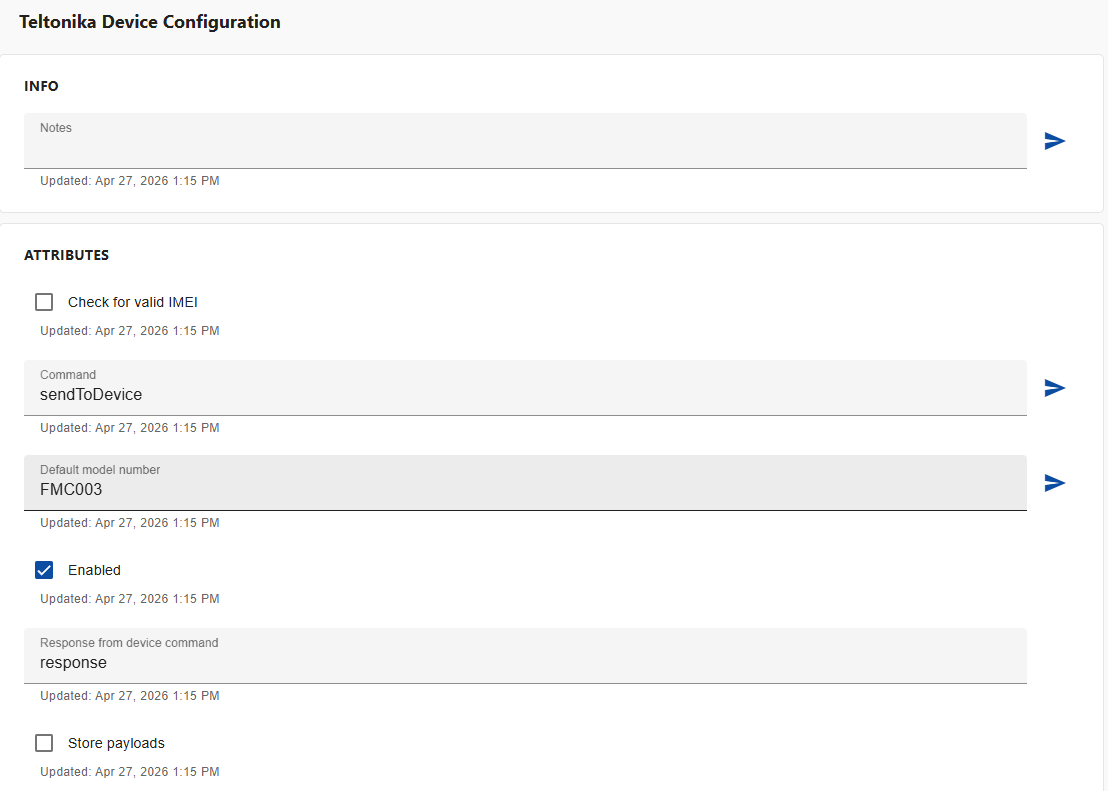
After installing OpenRemote, there is a default configuration available for the FMC003 device.
I remember that when I removed it, it caused significant issues in the system.
Why does deleting this default configuration lead to problems?
3. Using a different device (FMC920)
What is the correct approach when using a device other than FMC003?
Should I create a new Teltonika Model Configuration Asset for FMC920?
What should I do if my FMC920 appears in the system as an FMC003 device (the Model Number field in the Car Asset shows FMC003 for IMEI xxxxxxxxxxxxxx)?
4. Admin password management
Is it possible to change the Admin user password at any time?
I see that it is initially set via an environment variable in the .env file.
Should I change it there, or is it safe (and recommended) to change it directly from the OpenRemote UI/panel?
When there are two certificates, it’s fine if you don’t reverse the chain.
The default configuration for the FMC003 is there so that there is a starting point for users to add their own devices. Currently, if there is no configuration available, the Teltonika integration cannot retrieve critical information about itself, so it starts misbehaving. I recommend creating a new Teltonika Model Configuration asset first, configuring it, and then deleting the default one.
The idea is that you create a different model configuration asset as described above, and then set the default model number to “FMC920”, so that OpenRemote knows that when devices connect, it should use the FMC920 asset to decode the incoming values.
The ideal way is to change the environment variable itself and restart the instance. This will change the password wherever it is needed.
There is also a new version of the fleet management integration that is being worked on that should reduce a lot of these painpoints. I am looking forward to releasing that soon.
Does setting the default model number to “FMC920” mean that every device connecting to the server via MQTT will be treated as an FMC920? What happens if I later want to connect a different model, for example FMC003? Wouldn’t this effectively limit the system so that only one device model works correctly?
Also, what exactly happens when I change the Model Number field for a specific asset (e.g., with IMEI xxxxxxx)? Will OpenRemote then use the Teltonika model configuration asset with the matching name and start interpreting incoming data based on its parameters?
Finally, if a device (e.g., FMC920) connects to the server before I create the corresponding Teltonika model configuration asset and define its JSON parameters — will I need to delete and recreate the device asset (IMEI) for the data to start being decoded correctly? Or will it automatically pick up the configuration once it’s added?
So, does that mean the fullchain.pem certificate is uploaded to the device only once and does not have an expiration date?
UPDATE: This is completely false. Change the environment variable (OR_ADMIN_PASSWORD) and restart the instance doesn’t change password for admin. How to do that?
For the current version of fleet management, yes, but that is not catastrophic, as a very big percentage of the actual parameters to be parsed are constant across different types of devices.
Yes. The idea is that by default, the asset is assigned that default model number, but once the asset is created, you can manually change it and that will use the correct parser.
It does, you can use openssl or your browser to check when the certificate expires. It is the same certificate chain used on port 443. This is currently being worked on for enabling users to use their own specific certificates for fleet telematics, and to help users with easily downloading their certificates.
Sorry for the misinformation, look at this post for more info.
Does the fullchain.pem certificate—which is uploaded to a Teltonika device under Security → Certificates—need to be re-uploaded every time the HTTPS certificate is renewed?
That seems unnecessarily complicated. It would mean you have to track and update certificates on each Teltonika device individually. And what if you’re managing a large number of devices? That quickly becomes difficult to scale and hard to manage.
Please refer to Custom certificate format for using your own custom certificates with the OpenRemote custom proxy. This would allow you to use custom certificates with longer lifetimes.
If you would like to use automatically generated certificates by letsencrypt, then there is no other way at the moment. We are most definitely open to contributions so feel free to give it a try.