Thanks @panos, I already suspected that. Unfortunately, I’m not a developer, so it’s a bit difficult for me because I can’t just edit a file, you have to build your own custom project. I was hoping it could be done through the GUI.
Who knows, LLMs have gotten quite good! I know that we do have an asset type maker in our roadmap, but I am unsure of its state.
Yes @PeterB . Just create a custom asset type by changing the variables like AssetName and extend it with the CarAsset. The template is present in the repository. That’s what worked for me.
After that rebuild the manager using the gradle install command and restart the docker images.
I made a Truck Asset and Diesel Gen Asset using this method.
Hey, i created a custom asset but it’s not working. It’s not visible in the GUI. I did the following steps:
git clone https://github.com/openremote/fleet-management.git
cd fleet-management
Then i created a new file: model/src/main/java/org/openremote/model/custom/ExtendedCarAsset.java
package org.openremote.model.custom;

import jakarta.persistence.Entity;
import org.openremote.model.Constants;
import org.openremote.model.asset.AssetDescriptor;
import org.openremote.model.teltonika.TeltonikaModelConfigurationAsset;
import org.openremote.model.value.AttributeDescriptor;
import org.openremote.model.value.ValueType;

import java.util.Optional;

/**
 * Extended Car Asset mit Coolant Temperature Parameter (Teltonika ID 32)
 */
@Entity
public class ExtendedCarAsset extends VehicleAsset {

    public static final AttributeDescriptor<Integer> COOLANT_TEMPERATURE =
        new AttributeDescriptor<>("32", ValueType.INTEGER)
            .withOptional(true)
            .withMeta(TeltonikaModelConfigurationAsset.getPayloadAttributeMeta("Coolant temperature"))
            .withUnits(Constants.UNITS_CELSIUS);

    public static final AssetDescriptor<ExtendedCarAsset> DESCRIPTOR =
        new AssetDescriptor<>("extendedCar", null, ExtendedCarAsset.class);

    protected ExtendedCarAsset() {
        super();
    }

    public ExtendedCarAsset(String name) {
        super(name);
    }

    public Optional<Integer> getCoolantTemperature() {
        return getAttributes().getValue(COOLANT_TEMPERATURE);
    }

    public ExtendedCarAsset setCoolantTemperature(Integer value) {
        getAttributes().getOrCreate(COOLANT_TEMPERATURE).setValue(value);
        return this;
    }
}
Then i was running the following commands:
./gradlew clean installDist
docker build -t fleet-deployment:latest ./deployment/build/
docker-compose -p fleet-management up -d
But the new Asset Type is not visible there:
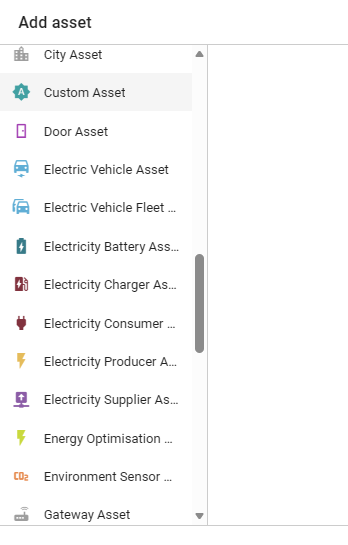
Have I forgotten something, or why isn’t it working? I’m also confused about two things…
The tutorial says: “Inherit the Car Asset Type” (Tutorial: Create your own Fleet Management System · openremote/fleet-management Wiki · GitHub)
But the official documentation says: “Extend VehicleAsset” (Custom Asset Types · openremote/fleet-management Wiki · GitHub)
That’s a contradiction, isn’t it? 
I will answer myself  i have found the problem. Important was to delete the existing docker volume, not just stop the container.
If you modify and rebuild the JAR extension, you must:
 Rebuild the JAR (./gradlew)
Rebuild the Docker image (docker build)
Stop the container (docker-compose down)
Delete the volume (docker volume rm or down -v)
Restart the container (docker-compose up)
Any Idea about that question?
I guess it depends what you want to use as basis right? Means if i want to use all Attributes from existing CarAsset i create a custom which extend from CarAsset and otherwise i choose Option B and extend from VehicleAsset. Is that right?
A) Asset - VehicleAsset - CarAsset - CustomCarAsset
B) Asset - VehicleAsset - CustomVehicleAsset
Hi @PeterB ,
Both of these options would work, the point is there to make sure that people extend VehicleAsset, instead of directly inheriting from Asset, as the Teltonika integration uses attributes that are defined in VehicleAsset.
I have a question: When I configure my tracker (FMC003), the device automatically appears in my OpenRemote project. However, it’s recognized there as a CarAsset, and I can’t change the asset type.
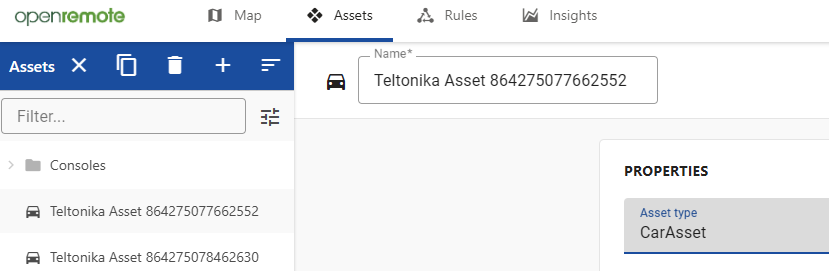
If I add a new asset with my own asset type, how do I link it to my tracker?
Did you change the reference here?
No, I haven’t adjusted that. Is that the only place, or are there others? Should I delete the two existing assets and wait until they are recreated?
That’s the only reference you need to change.
To change the asset types, you’ll need to delete them so that they can be recreated.
Best of luck!
Thank you so much, that was the trick and now it’s working!
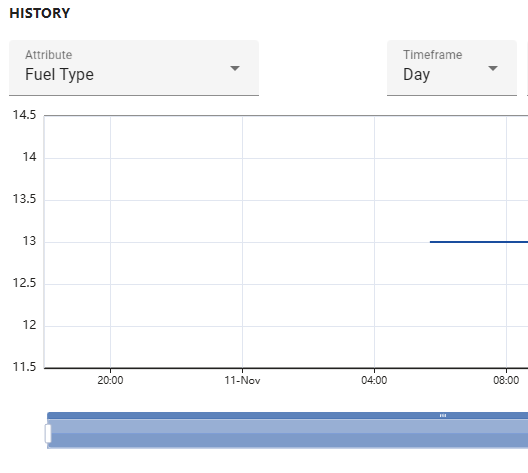
Is there a way to display the fuel type differently?
Right now I only see the numbers and need to know what they are.
Can this be changed somehow?
9 Bifuel running Gasoline
10 Bifuel running Methanol
11 Bifuel running Ethanol
12 Bifuel running LPG
13 Bifuel running CNG
14 Bifuel running Propane
Hey @PeterB ,
This would require custom code to be written on top of the fleet management repository.
Essentially, when processing this Teltonika Parameter, you’d need to let OpenRemote know that this is an enumerable property, namely those above elements you mentioned, and make sure it parses them correctly.
This topic was automatically closed 90 days after the last reply. New replies are no longer allowed.