Hello, i need some help with the fleet Management Project. I have a running openremote Environment via Docker. I followed the Tutorial but i dont understand how to get the fleetmanagement up and running. So right now i am missing vehicleasset and so on. What is the best way to get all these fleetmanagement features? Maybe someone can lead me to the right direction how to add these Features to my running system. Thanks and best regards,
If you have properly installed the fleet management project, you should be able to view a Teltonika configuration asset in the master realm.
In the documentation, there’s a guide that shows you how to setup a Teltonika device to connect it to OpenRemote. After you’ve set that up, the device should be sending data to OpenRemote, at which point, the car asset will be created with the data coming from the device.
Hello, I got it working. The deployment-data volume from the image: pankalog/fleet-deployment wasn’t working properly because I mounted it incorrectly. Thank you very much for your support!
Because of updates in the OpenRemote manager, we had to remove the map tracking functionality at this time. We are looking for ways to get that functionality back. You can read more about it here.
Hello, sorry i have some more questions. I will use Teltonika FMC003 Device to integrate. I guess i have to connect via TCP over TLS instead of MQTT. I know the device support both options, but in my scenario it will not work as far i know. In my environment i have an apache reverse proxy (there are other reasons why i cant change this proxy) and this system can not handle mqtt traffic. Is there a way to connect to the fleetmanagement via TCP? Or has someone experience if it is possible to connect via mqtts using Apache Reverse proxy?
I tried a workaround with HAProxy only for MQTTS traffic. It was working, i could connect but then i restarted the the openremote manager container and now it’s no more working. The Log shows the following:
2025-10-05 18:00:37.698  INFO    [main                          ] org.apache.activemq.artemis.core.server  : AMQ221001: Apache ActiveMQ Artemis Message Broker version 2.42.0 [localhost, nodeID=6eea67b3-a204-11f0-99a4-5a6547cc4d9d]
2025-10-05 18:00:37.699  FINE    [main                          ] emote.manager.mqtt.MQTTBrokerService.API : Started MQTT broker
2025-10-05 18:00:37.840  INFO    [main                          ] mote.manager.mqtt.DefaultMQTTHandler.API : Adding publish consumer for topic '+/+/writeattributevalue/#': handler=DefaultMQTTHandler
2025-10-05 18:00:37.861  INFO    [main                          ] mote.manager.mqtt.DefaultMQTTHandler.API : Adding publish consumer for topic '+/+/writeattribute/#': handler=DefaultMQTTHandler
2025-10-05 18:00:37.868  INFO    [main                          ] qtt.UserAssetProvisioningMQTTHandler.API : Adding publish consumer for topic 'provisioning/+/request': handler=UserAssetProvisioningMQTTHandler
2025-10-05 18:00:37.875  INFO    [main                          ] atics.teltonika.TeltonikaMQTTHandler.API : Adding publish consumer for topic '+/+/teltonika/+/data': handler=TeltonikaMQTTHandler
2025-10-05 18:00:37.880  INFO    [main                          ] atics.teltonika.TeltonikaMQTTHandler.API : Adding publish consumer for topic '+/+/teltonika/+/commands': handler=TeltonikaMQTTHandler
2025-10-05 18:00:37.883  INFO    [main                          ] atics.teltonika.TeltonikaMQTTHandler.API : Starting Teltonika MQTT Handler
2025-10-05 18:00:37.955  WARNING [main                          ] atics.teltonika.TeltonikaMQTTHandler.API : Anonymous MQTT connections are allowed, only for the Teltonika Telematics devices, until auto-provisioning is fully implemented or until Teltonika Telematics devices allow user-defined username and password MQTT login.
2025-10-05 18:00:37.958  SEVERE  [main                          ] atics.teltonika.TeltonikaMQTTHandler.API : No Teltonika configuration assets found! Exiting...
2025-10-05 18:00:37.958  WARNING [main                          ] emote.manager.mqtt.MQTTBrokerService.API : MQTT custom handler threw an exception whilst starting: handler=TeltonikaMQTTHandler
java.lang.NullPointerException
	at telematics.teltonika.TeltonikaMQTTHandler.start(TeltonikaMQTTHandler.java:133)
	at org.openremote.manager.mqtt.MQTTBrokerService.start(MQTTBrokerService.java:316)
	at org.openremote.container.Container.start(Container.java:179)
	at org.openremote.container.Container.startBackground(Container.java:223)
	at org.openremote.manager.Main.main(Main.java:36)
2025-10-05 18:00:37.959  SEVERE  [main                          ] org.openremote.container.Container       : >>> Runtime container startup failed
java.lang.NullPointerException
	at telematics.teltonika.TeltonikaMQTTHandler.start(TeltonikaMQTTHandler.java:133)
	at org.openremote.manager.mqtt.MQTTBrokerService.start(MQTTBrokerService.java:316)
	at org.openremote.container.Container.start(Container.java:179)
	at org.openremote.container.Container.startBackground(Container.java:223)
	at org.openremote.manager.Main.main(Main.java:36)
2025-10-05 18:00:45.246  INFO    [main                          ] org.openremote.container.Container       : Metrics enabled: false
2025-10-05 18:00:45.259  INFO    [main                          ] org.openremote.container.Container       : >>> Starting runtime container...
2025-10-05 18:00:45.259  INFO    [main                          ] org.openremote.container.Container       : Initializing service: org.openremote.manager.syslog.SyslogService
2025-10-05 18:00:45.260  INFO    [main                          ] .openremote.manager.syslog.SyslogService : Syslog service enabled
2025-10-05 18:00:45.263  INFO    [main                          ] org.openremote.container.Container       : Initializing service: org.openremote.manager.setup.KeycloakInitService
2025-10-05 18:00:45.717  INFO    [main                          ] remote.manager.setup.KeycloakInitService : Connecting to Keycloak server: http://openremote-kc:8080/auth
2025-10-05 18:00:45.781  INFO    [main                          ] remote.manager.setup.KeycloakInitService : Successfully connected to Keycloak server: http://openremote-kc:8080/auth
2025-10-05 18:00:45.781  INFO    [main                          ] org.openremote.container.Container       : Initializing service: org.openremote.manager.persistence.ManagerPersistenceService
2025-10-05 18:00:45.782  INFO    [main                          ] container.persistence.PersistenceService : Preparing persistence service for database: POSTGRES
2025-10-05 18:00:45.789  INFO    [main                          ] container.persistence.PersistenceService : Setting storage directory to '/storage'
The logs show that something went wrong with loading the Teltonika configuration assets when starting the manager.
This usually happens when something went wrong with loading the database. I’d recommend removing the manager-data volume (this removes all data from the database), and starting again.
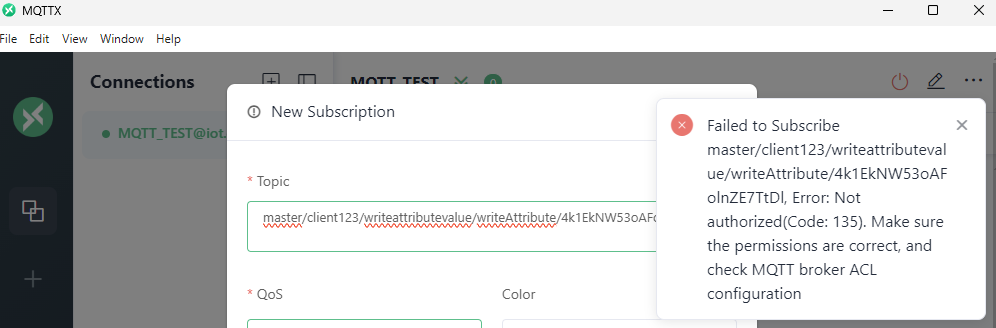
Okay it’s working again, thanks I guess the problem was that i deleted the default FMC003 Device. Anyway, i followed the Guide how to Connect your MQTT Client. I am able to connect but publish attributes from MQTT Client is not working. I get the following error:
I think i found the problem, i added the topic at the wrong place in the toolbox. Now i can publish but Value does not change at the asset.
The log shows the following: `2025-10-05 19:45:34.962  FINE    [ContainerExecutor-32          ] nremote.manager.event.ClientEventService : Client connection created: /172.23.4.6:35736
2025-10-05 19:45:37.827  FINE    [Thread-1 (ActiveMQ-serve..ost)] nremote.manager.event.ClientEventService : Client not authorised to send event: type=attribute, requestRealm=master, user=service-account-mqttsvc, userRealm=master
2025-10-05 19:45:37.827  FINE    [Thread-1 (ActiveMQ-serve..ost)] mote.manager.mqtt.DefaultMQTTHandler.API : Publish was not authorised for this user and topic: topic=master/client123/writeattributevalue/writeAttribute/4k1EkNW53oAFolnZE7TtDl, subject=org.openremote.container.security.keycloak.AccessTokenAuthContext@29c460a5
2025-10-05 19:45:47.564  FINE    [Thread-1 (ActiveMQ-serve..ost)] nremote.manager.event.ClientEventService : Client not authorised to send event: type=attribute, requestRealm=master, user=service-account-mqttsvc, userRealm=master
2025-10-05 19:45:47.564  FINE    [Thread-1 (ActiveMQ-serve..ost)] mote.manager.mqtt.DefaultMQTTHandler.API : Publish was not authorised for this user and topic: topic=master/client123/writeattributevalue/writeAttribute/4k1EkNW53oAFolnZE7TtDl, subject=org.openremote.container.security.keycloak.AccessTokenAuthContext@19e1c7a4
2025-10-05 19:46:23.791  FINE    [Thread-1 (ActiveMQ-serve..ost)] nremote.manager.event.ClientEventService : Client not authorised to send event: type=attribute, requestRealm=master, user=service-account-mqttsvc, userRealm=master
2025-10-05 19:46:23.791  FINE    [Thread-1 (ActiveMQ-serve..ost)] mote.manager.mqtt.DefaultMQTTHandler.API : Publish was not authorised for this user and topic: topic=master/client123/writeattributevalue/writeAttribute/4k1EkNW53oAFolnZE7TtDl, subject=org.openremote.container.security.keycloak.AccessTokenAuthContext@238b11ab
2025-10-05 19:47:06.616  FINE    [Thread-14 (ActiveMQ-remo..288)] emote.manager.mqtt.MQTTBrokerService.API : Client disconnected: connection=172.23.4.3:42464, clientID=client123, subject=service-account-mqttsvc
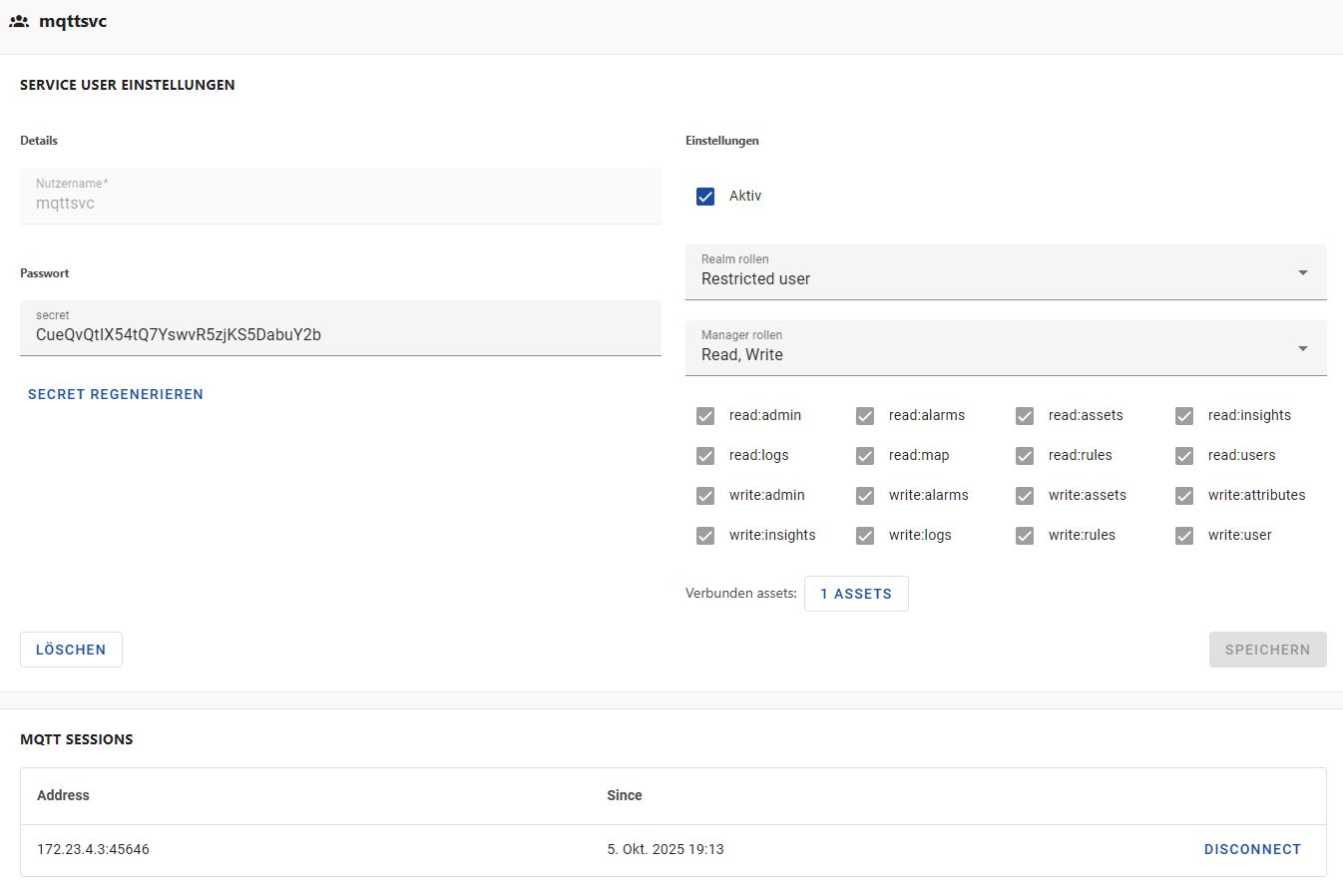
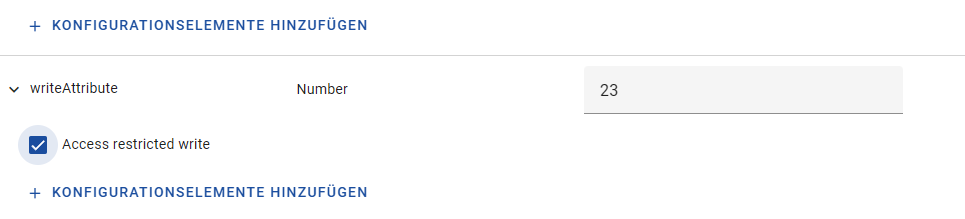
I’m not sure what could be going wrong, but it looks like the restricted service user you made isn’t linked to the asset, or the attributes are not marked with the “Restricted Write” meta item.
“Hi, I just wanted to remind you of my question. Did I do something wrong, or is it normal that I have to enable these configuration attributes for it to work? This point isn’t mentioned in the documentation.”
The Access Restricted Write meta-item denotes that an attribute can only be accessed by the (service) users that have been linked to that Attribute. Earlier, you linked your service user to that asset, which means that this service user does have the ability to access that attribute. If that service user tries to access another attribute that does have that meta item, and the user hasn’t been linked to that asset, then the write event will fail.
Hello community, I’m currently working on integrating an FMC003 device into the OpenRemote Fleet. Everything has worked fine so far, but I’m running into a problem with the Dashboard (Insights). I added a table, but not all attributes are available within it. For example, I’d like to include the Coolant Temperature value in the table, but it’s not available in the selection. I can pick that value as an individual attribute, gauge, or bar chart, but not within the table. How can this be achieved? Thanks in advance!
This is intended functionality of OpenRemote. What is happening is that the asset type of the Car Asset, that is the asset type of the assets that the fleet integration makes, has very specific and limited predefined attributes in it (which doesn’t, for example, include Coolant Temperature). This means that you cannot use “any of this type” for rules, or insights widgets, on any attributes that are not currently defined by the asset type that is used.
You can find more documentation about this in the wiki. There was a discussion about custom asset types some days ago here.
 I guess the problem was that i deleted the default FMC003 Device. Anyway, i followed the Guide how to Connect your MQTT Client. I am able to connect but publish attributes from MQTT Client is not working. I get the following error: