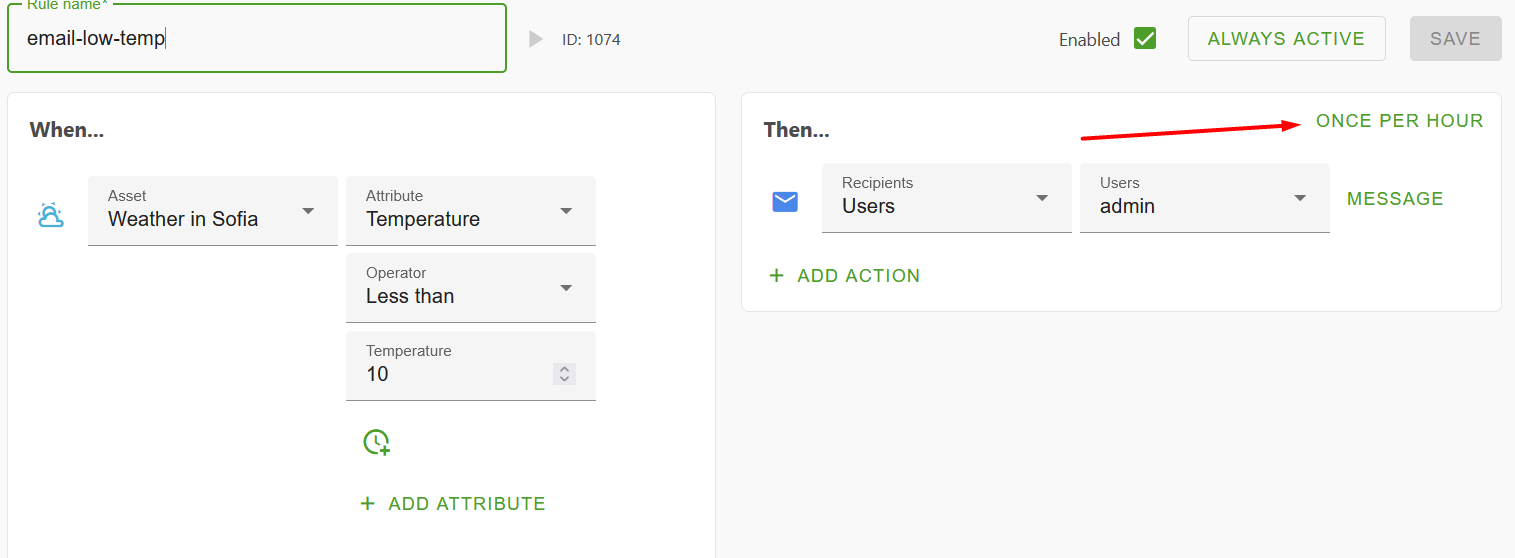
I am trying to email alerts working. Email is maintained in compose-docker.yml, visible if I print env vars. I can get in flow to create web alert(if I setup separate one for test purpose). But I cannot get OR send emails I cannot see it even attempting the logs.
Could you maybe share your docker-compose.yml file? That way we can see the configuration you deployed.
Please make sure to remove any classified information, such as SMTP credentials, secrets, etc.
This is my config. The problem is that I do not see in OR logs(from web interface) that it even attempts to send these.
# OpenRemote v3
#
# Profile that runs the stack by default on https://localhost using a self-signed SSL certificate,
# but optionally on https://$OR_HOSTNAME with an auto generated SSL certificate from Letsencrypt.
#
# It is configured to use the AWS logging driver.
#
volumes:
  proxy-data:
  manager-data:
  postgresql-data:

services:

  proxy:
    image: openremote/proxy:${PROXY_VERSION:-latest}
    restart: always
    depends_on:
      manager:
        condition: service_healthy
    ports:
      - "80:80" # Needed for SSL generation using letsencrypt
      - "${OR_SSL_PORT:-443}:443"
      - "8883:8883"
      - "127.0.0.1:8404:8404" # Localhost metrics access
      - "${PRIVATE_IP:-127.0.0.1}:8404:8404" # Allows to also expose metrics on a given IP address,
                                             # intended to be IP of the interface of the private subnet of the EC2 VM
    volumes:
      - proxy-data:/deployment
    environment:
      LE_EMAIL: ${OR_EMAIL_ADMIN:-}
      DOMAINNAME: ${OR_HOSTNAME:-localhost}
      DOMAINNAMES: ${OR_ADDITIONAL_HOSTNAMES:-}
      # USE A CUSTOM PROXY CONFIG - COPY FROM https://raw.githubusercontent.com/openremote/proxy/main/haproxy.cfg
      #HAPROXY_CONFIG: '/data/proxy/haproxy.cfg'

  postgresql:
    restart: always
    image: openremote/postgresql:${POSTGRESQL_VERSION:-latest}
    shm_size: 128mb
    volumes:
      - postgresql-data:/var/lib/postgresql/data
      - manager-data:/storage

  keycloak:
    restart: always
    image: openremote/keycloak:${KEYCLOAK_VERSION:-latest}
    depends_on:
      postgresql:
        condition: service_healthy
    volumes:
      - ./deployment:/deployment
    environment:
      KEYCLOAK_ADMIN_PASSWORD: ${OR_ADMIN_PASSWORD:-secret}
      KC_HOSTNAME: ${OR_HOSTNAME:-localhost}
      KC_HOSTNAME_PORT: ${OR_SSL_PORT:--1}


  manager:
#    privileged: true
    restart: always
    image: openremote/manager:${MANAGER_VERSION:-latest}
    depends_on:
      keycloak:
        condition: service_healthy
    ports:
      - "127.0.0.1:8405:8405" # Localhost metrics access
      - "${PRIVATE_IP:-127.0.0.1}:8405:8405" # Allows to also expose metrics on a given IP address,
                                             # intended to be IP of the interface of the private subnet of the EC2 VM
    environment:
      OR_SETUP_TYPE:
      OR_ADMIN_PASSWORD:
      OR_SETUP_RUN_ON_RESTART:
      OR_EMAIL_HOST: smtp.xxxxxxx.com
      OR_EMAIL_PORT: 25
      OR_EMAIL_USER:
      OR_EMAIL_PASSWORD:
      OR_EMAIL_X_HEADERS:
      OR_EMAIL_FROM: smartcity@xxxxxxx.com
      OR_EMAIL_ADMIN: alert@xxxxxxx.com
      OR_METRICS_ENABLED: ${OR_METRICS_ENABLED:-true}
      OR_HOSTNAME: ${OR_HOSTNAME:-localhost}
      OR_ADDITIONAL_HOSTNAMES:
      OR_SSL_PORT: ${OR_SSL_PORT:--1}
      OR_DEV_MODE: ${OR_DEV_MODE:-false}

      # The following variables will configure the demo
      OR_FORECAST_SOLAR_API_KEY:
      OR_OPEN_WEATHER_API_APP_ID:
      OR_SETUP_IMPORT_DEMO_AGENT_KNX:
      OR_SETUP_IMPORT_DEMO_AGENT_VELBUS:
    volumes:
      - manager-data:/storage
Thanks for sharing the docker-compose.yml file. I noticed you’re using port 25 for sending emails, which is often blocked by cloud providers. Are you running OpenRemote locally?
Hi, It is run in professional environment - 25 is not blocked. I cannot see logs for attempted sent.
If you can give me some step by step instruction how to send test emails will be appreciated. I have some suspicion that software is not attempting to send the email. I might be doing something wrong with web interface or something…
 I cannot see it even attempting the logs.