SSL certificate Teltonika device (tracker FMC003)

Hello, according to the following instructions, you should customize the SSL certificate for Teltonika devices and reverse the order. Is this still the case?

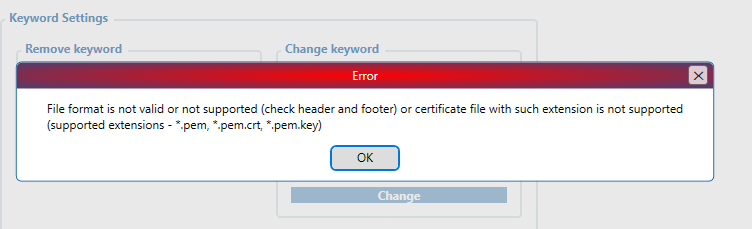
I receive the following error message when I try to upload the certificate.

If I only use the root certificate (ISRG Root X1), the upload works. I can also connect to the MQTTX tool via MQTTS, but I get an SSL handshake error when establishing a connection with the Teltonika devices. The device is connected, but the SSL error message puzzles me. So my question is: is it enough to have the root certificate in the device, or does it have to be as described in the instructions?

image

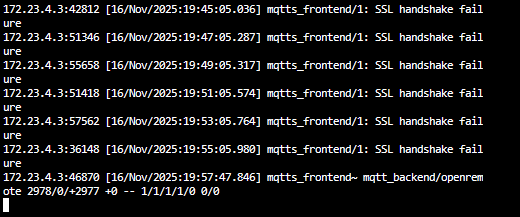
Hello, does anyone have any ideas? The tracker connects and delivers data, but the error messages are puzzling me. As mentioned before, I only imported the root CA into the FMC003, but not the reverse chain. It couldn’t be imported.

Nov 18 13:55:19 srv.example.com haproxy[2166674]: 212.65.103.86:59237 [18/Nov/2025:13:55:17.367] mqtts_frontend~ mqtt_backend/openremote 2480/1/+2480 +0 -- 1/1/1/1/0 0/0 [SSL: Ver=TLSv1.2 | Cipher=ECDHE-RSA-AES256-GCM-SHA384]
Nov 18 14:00:04 srv.example.com haproxy[2166674]: 212.65.103.86:51492 [18/Nov/2025:13:59:54.259] mqtts_frontend/1: SSL handshake failure
Nov 18 14:05:05 srv.example.com haproxy[2166674]: 212.65.103.86:51493 [18/Nov/2025:14:04:54.795] mqtts_frontend/1: SSL handshake failure
Nov 18 14:07:27 srv.example.com haproxy[2166674]: 212.65.103.86:59238 [18/Nov/2025:14:07:23.927] mqtts_frontend~ mqtt_backend/openremote 3502/0/+3501 +0 -- 1/1/1/1/0 0/0 [SSL: Ver=TLSv1.2 | Cipher=ECDHE-RSA-AES256-GCM-SHA384]
Nov 18 14:10:06 srv.example.com haproxy[2166674]: 212.65.103.86:51494 [18/Nov/2025:14:09:55.660] mqtts_frontend/1: SSL handshake failure
Nov 18 14:14:50 srv.example.com haproxy[2166674]: 212.65.103.86:59239 [18/Nov/2025:14:14:35.743] mqtts_frontend/1: SSL handshake failure (error:0A00010B:SSL routines::wrong version number)
Nov 18 14:15:06 srv.example.com haproxy[2166674]: 212.65.103.86:51495 [18/Nov/2025:14:14:55.849] mqtts_frontend/1: SSL handshake failure
Nov 18 14:53:53 srv.example.com haproxy[2166674]: 212.65.103.86:59260 [18/Nov/2025:14:53:28.705] mqtts_frontend/1: SSL handshake failure
Nov 18 14:54:56 srv.example.com haproxy[2166674]: 212.65.103.86:59261 [18/Nov/2025:14:54:45.947] mqtts_frontend/1: SSL handshake failure
Nov 18 14:55:10 srv.example.com haproxy[2166674]: 212.65.103.86:51503 [18/Nov/2025:14:55:00.006] mqtts_frontend/1: SSL handshake failure
Nov 18 14:55:38 srv.example.com haproxy[2166674]: 212.65.103.86:59262 [18/Nov/2025:14:55:27.800] mqtts_frontend/1: SSL handshake failure
Nov 18 14:57:38 srv.example.com haproxy[2166674]: 212.65.103.86:59263 [18/Nov/2025:14:57:27.570] mqtts_frontend/1: SSL handshake failure
Nov 18 14:59:39 srv.example.com haproxy[2166674]: 212.65.103.86:59264 [18/Nov/2025:15:25:30.650] mqtts_frontend/1: SSL handshake failure
Nov 18 15:27:41 srv.example.com haproxy[2166674]: 212.65.103.86:59278 [18/Nov/2025:15:27:30.814] mqtts_frontend/1: SSL handshake failure
Nov 18 15:29:44 srv.example.com haproxy[2166674]: 212.65.103.86:15128 [18/Nov/2025:15:29:30.993] mqtts_frontend/1: SSL handshake failure
Nov 18 15:30:14 srv.example.com haproxy[2166674]: 212.65.103.86:51510 [18/Nov/2025:15:30:03.721] mqtts_frontend/1: SSL handshake failure
Nov 18 15:31:42 srv.example.com haproxy[2166674]: 212.65.103.86:59280 [18/Nov/2025:15:31:31.368] mqtts_frontend/1: SSL handshake failure
Nov 18 15:33:42 srv.example.com haproxy[2166674]: 212.65.103.86:59281 [18/Nov/2025:15:33:31.490] mqtts_frontend/1: SSL handshake failure
Nov 18 15:35:14 srv.example.com haproxy[2166674]: 212.65.103.86:51511 [18/Nov/2025:15:35:04.177] mqtts_frontend/1: SSL handshake failure
Nov 18 15:35:42 srv.example.com haproxy[2166674]: 212.65.103.86:59282 [18/Nov/2025:15:35:31.718] mqtts_frontend/1: SSL handshake failure
Nov 18 15:37:42 srv.example.com haproxy[2166674]: 212.65.103.86:59283 [18/Nov/2025:15:37:31.877] mqtts_frontend/1: SSL handshake failure
Nov 18 15:39:43 srv.example.com haproxy[2166674]: 212.65.103.86:59284 [18/Nov/2025:15:39:32.235] mqtts_frontend/1: SSL handshake failure
Nov 18 15:40:15 srv.example.com haproxy[2166674]: 212.65.103.86:51512 [18/Nov/2025:15:40:04.780] mqtts_frontend/1: SSL handshake failure
Nov 18 15:41:43 srv.example.com haproxy[2166674]: 212.65.103.86:59285 [18/Nov/2025:15:41:32.403] mqtts_frontend/1: SSL handshake failure
Nov 18 15:43:43 srv.example.com haproxy[2166674]: 212.65.103.86:59286 [18/Nov/2025:15:43:32.548] mqtts_frontend/1: SSL handshake failure
Nov 18 15:45:15 srv.example.com haproxy[2166674]: 212.65.103.86:51513 [18/Nov/2025:15:45:05.202] mqtts_frontend/1: SSL handshake failure
Nov 18 15:45:43 srv.example.com haproxy[2166674]: 212.65.103.86:59287 [18/Nov/2025:15:45:32.906] mqtts_frontend/1: SSL handshake failure
Nov 18 15:47:43 srv.example.com haproxy[2166674]: 212.65.103.86:59288 [18/Nov/2025:15:47:32.969] mqtts_frontend/1: SSL handshake failure
Nov 18 15:50:01 srv.example.com haproxy[2166674]: 212.65.103.86:64799 [18/Nov/2025:15:49:58.230] mqtts_frontend~ mqtt_backend/openremote 3162/1/+3162 +0 -- 1/1/1/1/0 0/0 [SSL: Ver=TLSv1.2 | Cipher=ECDHE-RSA-AES256-GCM-SHA384]
Nov 18 15:50:16 srv.example.com haproxy[2166674]: 212.65.103.86:51514 [18/Nov/2025:15:50:05.818] mqtts_frontend/1: SSL handshake failure
Nov 18 15:55:16 srv.example.com haproxy[2166674]: 212.65.103.86:51515 [18/Nov/2025:15:55:06.246] mqtts_frontend/1: SSL handshake failure

This is my HAProxy Config:

# SSL Termination at HAProxy with forwarding to plain MQTT
global
    log stdout format raw local0 debug

    tune.ssl.default-dh-param 4096

    # TLS 1.2 mit modernen und Legacy-Cipher Suites
    ssl-default-bind-ciphers      ECDHE-RSA-AES256-GCM-SHA384:ECDHE-RSA-AES128-GCM-SHA256:AES256-SHA256:AES128-SHA256:!aNULL:!MD5
    ssl-default-bind-ciphersuites TLS_AES_256_GCM_SHA384:TLS_AES_128_GCM_SHA256:TLS_CHACHA20_POLY1305_SHA256
    ssl-default-bind-options      ssl-min-ver TLSv1.2 no-tls-tickets prefer-client-ciphers

defaults
    log     global
    mode    tcp
    option  tcplog
    option  logasap
    timeout connect 10s
    timeout client 60s
    timeout server 60s
    option clitcpka
    option srvtcpka
    maxconn 20000
    log-format "%ci:%cp [%t] %ft %b/%s %Tw/%Tc/%Tt %B %ts %ac/%fc/%bc/%sc/%rc %sq/%bq [SSL: Ver=%sslv | Cipher=%sslc] %r"
	
frontend mqtts_frontend
    bind 0.0.0.0:8883 ssl crt /etc/haproxy/certs/cert.pem
    mode tcp
    default_backend mqtt_backend

backend mqtt_backend
    mode tcp
    option tcpka
    server openremote 127.0.0.1:1883 check

Best regards,
Peter

Hey @PeterB ,

The Teltonika Configurator only allows the certificates to be inserted with the correct file name extensions, which you can see in the screenshot you made above.

The certificate chain is there so that the device can perform the TLS process to securely connect to OpenRemote, and the entire certificate chain is required to allow that handshake to take place.

The SSL certificate needs to have a .pem extension to be inserted into the device using the Configurator. Make sure you use the entire chain in a pem file and insert it into the device. The quickstart has a command to help you with that.

Hey @panos thanks for response. Which Quickstart Document you are talking about?

The quickstart wiki page, found here.

Hello, I found the error! I am not using the Openremote proxy but my own HAProxy in conjunction with Let’s Encrypt certificates.

After obtaining the cert, you will have the following PEM-encoded files:

  • cert.pem: Your domain’s certificate
  • chain.pem: Let’s Encrypt chain certificate (Intermediate Certificate R13)
  • fullchain.pem: a combination of cert.pem and chain.pem
  • privkey.pem: the private key to your certificate

When setting up SSL termination with HAProxy, you need to combine these fullchain.pem and privkey.pem into one file.

The result is a certificate consisting of the domain certificate, intermediate certificate, and private key. This is exactly where I made my mistake: I only saw that it had three sections, but didn’t notice that it contained the private key and not all three certificates.

This means that Let’s Encrypt fullchain.pem does not contain the complete chain, only the intermediate certificate and the domain certificate!

So I added the ISRG Root X1 to the fullchain and then adjusted the order. The normal order is actually:

  1. Server certificate (domain)
  2. Intermediate certificate (R13)
  3. ISRG Root X1

According to the documentation (Openremote Fleetmanagement with Teltonika) you need this order:

  1. ISRG Root X1
  2. Intermediate Certificate (R13)
  3. Server certificate (domain)

In my Teltonica device (FMC003), I can upload both versions, the certificate with the normal order and also the reverse order. However, I followed the documentation and chosed the reverse order.
Thank you for your support!