Saarthi
September 28, 2025, 12:13pm
1
I have opened the port 8883:8883 in my ports section of the proxy in my docker compose file.
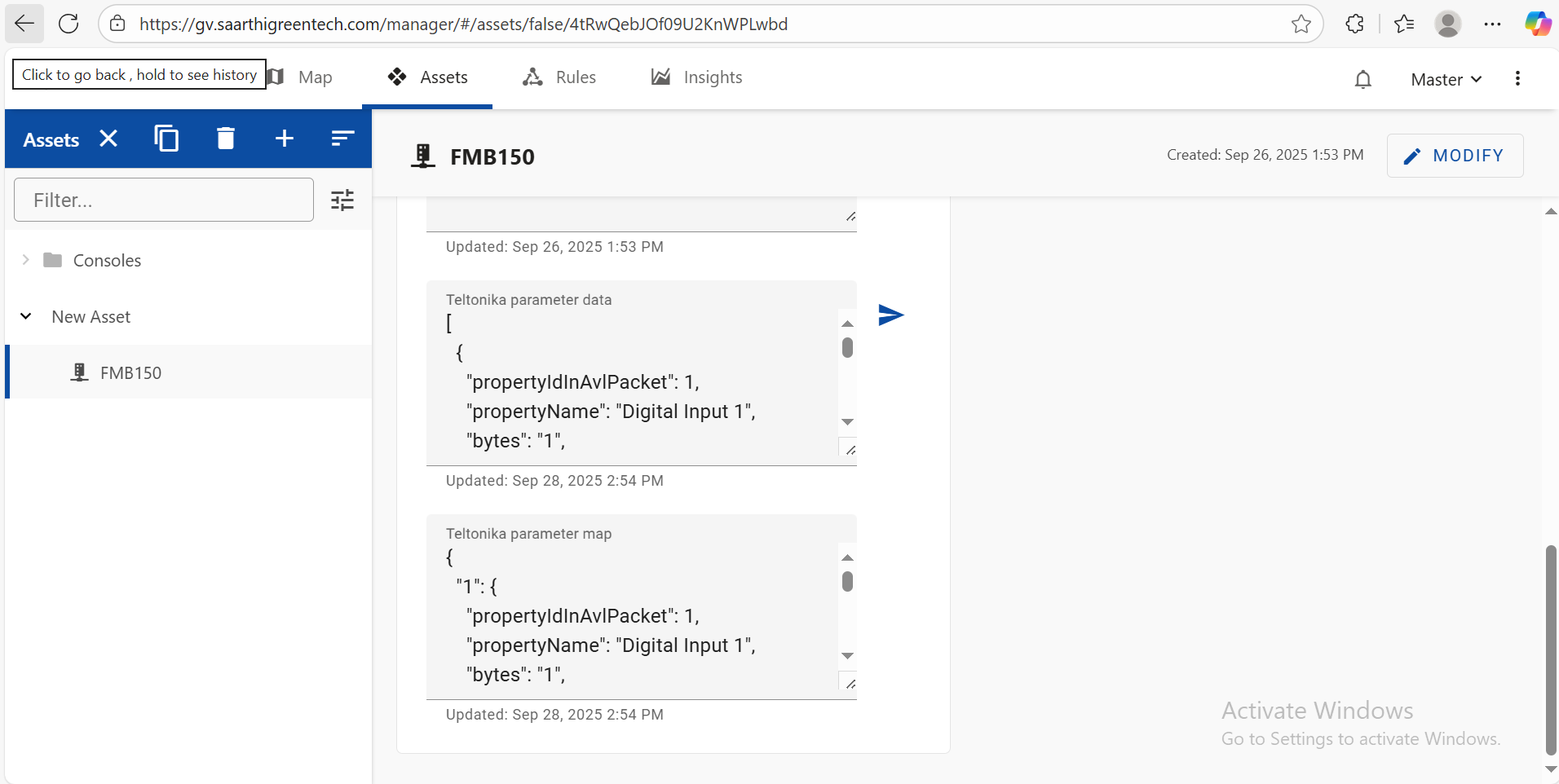
I created teltonika asset but I cant see the data anywhere.
panos
September 28, 2025, 12:19pm
2
Hello @Saarthi ,
Yet again, your logs, and screenshots, do not show anything that could point to any issue.
Please double-check the quickstart and tutorial and make sure that everything has been configured correctly. I believe that you haven’t correctly configured the device you’re trying to use.
Saarthi
September 28, 2025, 12:58pm
3
Is there any evident issues you can see here?
panos
September 28, 2025, 1:01pm
4
Hey @Saarthi ,
Have you correctly set the codec that is being sent to Codec JSON? Also, I’d recommend double-checking the proxy logs to see if there are any issues with the device when it is trying to connect.
Saarthi
September 29, 2025, 6:08am
5
Yes I have set it to Codec JSON and my proxy logs show nothing about the device being unable to connect.
root@srv626585:~/fleet-management# docker compose logs -f proxy
WARN[0000] /root/fleet-management/docker-compose.yml: the attribute `version` is obsolete, it will be ignored, please remove it to avoid potential confusion
proxy-1  | [INFO][2025-09-28 08:44:46] DOMAINNAMES: gv.saarthigreentech.com
proxy-1  | [INFO][2025-09-28 08:44:46] HAPROXY_CONFIG: /etc/haproxy/haproxy.cfg
proxy-1  | [INFO][2025-09-28 08:44:46] HAPROXY_CMD: haproxy -W -db -f /etc/haproxy/haproxy.cfg
proxy-1  | [INFO][2025-09-28 08:44:46] HAPROXY_USER_PARAMS:
proxy-1  | [INFO][2025-09-28 08:44:46] PROXY_LOGLEVEL: notice
proxy-1  | [INFO][2025-09-28 08:44:46] LUA_PATH:
proxy-1  | [INFO][2025-09-28 08:44:46] CERT_DIR: /deployment/certs
proxy-1  | [INFO][2025-09-28 08:44:46] LE_DIR: /deployment/letsencrypt
proxy-1  | [INFO][2025-09-28 08:44:46] LE_CMD: certbot certonly -n --logs-dir - -w /etc/haproxy/webroot  --email aryan.bhasein@saarthigreentech.com
proxy-1  | [INFO][2025-09-28 08:44:46] AWS_ROUTE53_ROLE:
proxy-1  | [INFO][2025-09-28 08:44:46] Checking HAProxy configuration: /etc/haproxy/haproxy.cfg
proxy-1  | [INFO][2025-09-28 08:44:53] Starting crond
proxy-1  | [INFO][2025-09-28 08:44:53] cert_init...waiting 10s for haproxy to be ready
proxy-1  | [INFO][2025-09-28 08:44:53] HAProxy starting
proxy-1  | [NOTICE]   (1) : New worker (37) forked
proxy-1  | [NOTICE]   (1) : Loading success.
proxy-1  | [WARNING]  (37) : mqtt/manager changed its IP from (none) to 172.19.0.4 by docker_resolver/dns.
proxy-1  | [WARNING]  (37) : Server mqtt/manager ('manager') is UP/READY (resolves again).
proxy-1  | [WARNING]  (37) : Server mqtt/manager administratively READY thanks to valid DNS answer.
proxy-1  | [WARNING]  (37) : manager_backend/manager changed its IP from (none) to 172.19.0.4 by DNS cache.
proxy-1  | [WARNING]  (37) : Server manager_backend/manager ('manager') is UP/READY (resolves again).
proxy-1  | [WARNING]  (37) : Server manager_backend/manager administratively READY thanks to valid DNS answer.
proxy-1  | [WARNING]  (37) : keycloak_backend/keycloak changed its IP from (none) to 172.19.0.3 by docker_resolver/dns.
proxy-1  | [WARNING]  (37) : Server keycloak_backend/keycloak ('keycloak') is UP/READY (resolves again).
proxy-1  | [WARNING]  (37) : Server keycloak_backend/keycloak administratively READY thanks to valid DNS answer.
proxy-1  | mqtt/manager changed its IP from (none) to 172.19.0.4 by docker_resolver/dns.
proxy-1  | Server mqtt/manager ('manager') is UP/READY (resolves again).
proxy-1  | Server mqtt/manager administratively READY thanks to valid DNS answer.
proxy-1  | manager_backend/manager changed its IP from (none) to 172.19.0.4 by DNS cache.
proxy-1  | Server manager_backend/manager ('manager') is UP/READY (resolves again).
proxy-1  | Server manager_backend/manager administratively READY thanks to valid DNS answer.
proxy-1  | keycloak_backend/keycloak changed its IP from (none) to 172.19.0.3 by docker_resolver/dns.
proxy-1  | Server keycloak_backend/keycloak ('keycloak') is UP/READY (resolves again).
proxy-1  | Server keycloak_backend/keycloak administratively READY thanks to valid DNS answer.
proxy-1  | [INFO][2025-09-28 08:45:03] Executing cert_init at Sun, 28 Sep 2025 08:45:03 +0000
proxy-1  | [INFO][2025-09-28 08:45:04] Symlinking first domain to built in cert directory to take precedence over self signed cert
proxy-1  | [INFO][2025-09-28 08:45:04] Updating haproxy cert chain for 'gv.saarthigreentech.com'
proxy-1  | [INFO][2025-09-28 08:45:05] Executing auto renew at Sun, 28 Sep 2025 08:45:05 +0000
proxy-1  | Saving debug log to /var/log/letsencrypt/letsencrypt.log
proxy-1  |
proxy-1  | - - - - - - - - - - - - - - - - - - - - - - - - - - - - - - - - - - - - - - - -
proxy-1  | Processing /deployment/letsencrypt/renewal/gv.saarthigreentech.com.conf
proxy-1  | - - - - - - - - - - - - - - - - - - - - - - - - - - - - - - - - - - - - - - - -
proxy-1  | Certificate not yet due for renewal
proxy-1  |
proxy-1  | - - - - - - - - - - - - - - - - - - - - - - - - - - - - - - - - - - - - - - - -
proxy-1  | The following certificates are not due for renewal yet:
proxy-1  |   /deployment/letsencrypt/live/gv.saarthigreentech.com/fullchain.pem expires on 2025-12-22 (skipped)
proxy-1  | No renewals were attempted.
proxy-1  | No hooks were run.
proxy-1  | - - - - - - - - - - - - - - - - - - - - - - - - - - - - - - - - - - - - - - - -
proxy-1  | [INFO][2025-09-28 08:45:53] Starting monitoring process
proxy-1  | [INFO][2025-09-28 08:45:53] Monitoring config file '/etc/haproxy/haproxy.cfg' and certs in '/deployment/certs' for changes...
Can you share some example screenshots of how the incoming teltonika data looks like? like the json and where the attributes would be visible?
Saarthi
September 29, 2025, 6:45am
6
Do these manager log tell something :
manager-1  | INFO    [main                          ] org.openremote.container.web.WebService  : Webserver ready on http://0.0.0.0:8080
manager-1  | INFO    [main                          ] org.openremote.container.Container       : Starting service: org.openremote.manager.rules.geofence.ORConsoleGeofenceAssetAdapter
manager-1  | INFO    [main                          ] org.openremote.container.Container       : >>> Runtime container startup complete
manager-1  | SEVERE  [Thread-4 (ActiveMQ-sched..ads)] org.apache.activemq.artemis.core.server  : AMQ224088: Timeout (10 seconds) on acceptor "tcp" during protocol handshake with /172.19.0.5:49478 has occurred.
manager-1  | INFO    [ContainerExecutor-31          ] atics.teltonika.TeltonikaMQTTHandler.API : Model map configuration event: [org.openremote.model.teltonika.TeltonikaParameter@b74b538[propertyIdInAvlPacket=239,propertyName=Ignition,bytes=1,type=Unsigned,min=0,max=1,multiplier=-,units=-,description=0 – Ignition Off 1 – Ignition On,hwSupport=FMBXXX FMB001 FMC001 FMB010 FMB002 FMB020 FMB003 FMB110 FMB120 FMB122 FMB125 FMB130 FMB140 FMB150 FMC150 FMM150 FMU125 FMB900 FMB920 FMB962 FMB964 FM3001 FMB202 FMB204 FMB206 FMT100 MTB100 FMP100 MSP500 FMC800 FMM800 FMM80A,parameterGroup=Permanent I/O Elements,additionalProperties={}], org.openremote.model.teltonika.TeltonikaParameter@27e11b8b[propertyIdInAvlPacket=1,propertyName=Digital Input 1,bytes=1,type=Unsigned,min=0,max=1,multiplier=-,units=-,description=Logic: 0/1,hwSupport=FMBXXX FMB001 FMC001 FMB010 FMB110 FMB120 FMB122 FMB125 FMU125 FMC125 FMM125 FMB130 FMU130 FMC130 FMM130 FMB140 FMB150 FMC150 FMM150 FMB900 FMB920 FMB962 FMB964 FMB202 FMB204 FMB206 MTB100,parameterGroup=Permanent I/O elements,additionalProperties={}]]
manager-1  | INFO    [ContainerExecutor-32          ] atics.teltonika.TeltonikaMQTTHandler.API : Model map configuration event: [org.openremote.model.teltonika.TeltonikaParameter@335a3ede[propertyIdInAvlPacket=1,propertyName=Digital Input 1,bytes=1,type=Unsigned,min=0,max=1,multiplier=-,units=-,description=Logic: 0/1,hwSupport=FMBXXX FMB001 FMC001 FMB010 FMB110 FMB120 FMB122 FMB125 FMU125 FMC125 FMM125 FMB130 FMU130 FMC130 FMM130 FMB140 FMB150 FMC150 FMM150 FMB900 FMB920 FMB962 FMB964 FMB202 FMB204 FMB206 MTB100,parameterGroup=Permanent I/O elements,additionalProperties={}]]
manager-1  | SEVERE  [Thread-3 (ActiveMQ-sched..ads)] org.apache.activemq.artemis.core.server  : AMQ224088: Timeout (10 seconds) on acceptor "tcp" during protocol handshake with /172.19.0.5:53722 has occurred.
manager-1  | INFO    [ContainerExecutor-307         ] remote.manager.asset.AssetStorageService : Anonymous AssetInfo subscriptions must specify a realm
manager-1  | SEVERE  [Thread-3 (ActiveMQ-sched..ads)] org.apache.activemq.artemis.core.server  : AMQ224088: Timeout (10 seconds) on acceptor "tcp" during protocol handshake with /172.19.0.5:58424 has occurred.
manager-1  | SEVERE  [Thread-1 (ActiveMQ-sched..ads)] org.apache.activemq.artemis.core.server  : AMQ224088: Timeout (10 seconds) on acceptor "tcp" during protocol handshake with /172.19.0.5:46622 has occurred.
manager-1  | SEVERE  [Thread-2 (ActiveMQ-sched..ads)] org.apache.activemq.artemis.core.server  : AMQ224088: Timeout (10 seconds) on acceptor "tcp" during protocol handshake with /172.19.0.5:51288 has occurred.
manager-1  | INFO    [Thread-2 (ActiveMQ-serve..ost)] nager.mqtt.ActiveMQORSecurityManager.API : Un-supported request sub: topic=$SYS/#, connection=172.19.0.5:54826, clientID=test, subject=anonymous
manager-1  | SEVERE  [Thread-2 (ActiveMQ-sched..ads)] org.apache.activemq.artemis.core.server  : AMQ224088: Timeout (10 seconds) on acceptor "tcp" during protocol handshake with /172.19.0.5:60210 has occurred.
manager-1  | INFO    [ContainerScheduledExecutor-4  ] .manager.datapoint.AssetDatapointService : Running data points purge daily task
manager-1  | SEVERE  [Thread-0 (ActiveMQ-sched..ads)] org.apache.activemq.artemis.core.server  : AMQ224088: Timeout (10 seconds) on acceptor "tcp" during protocol handshake with /172.19.0.5:42928 has occurred.
manager-1  | SEVERE  [Thread-2 (ActiveMQ-sched..ads)] org.apache.activemq.artemis.core.server  : AMQ224088: Timeout (10 seconds) on acceptor "tcp" during protocol handshake with /172.19.0.5:57218 has occurred.
panos
September 29, 2025, 7:06am
7
You can check the corresponding Groovy test I have written in my fleet-management repository.
panos
September 29, 2025, 7:10am
8
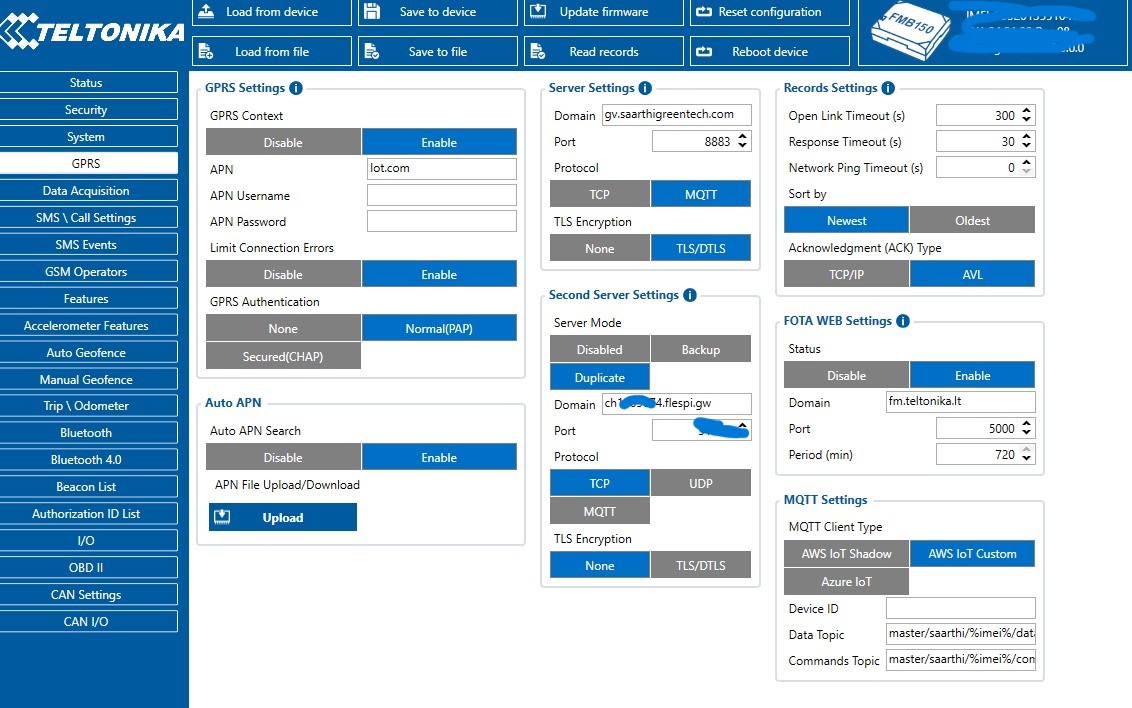
This seems like a configuration issue on the device side, the Un-supported request sub error shows that something is configured incorrectly in the MQTT settings on the MQTT settings.
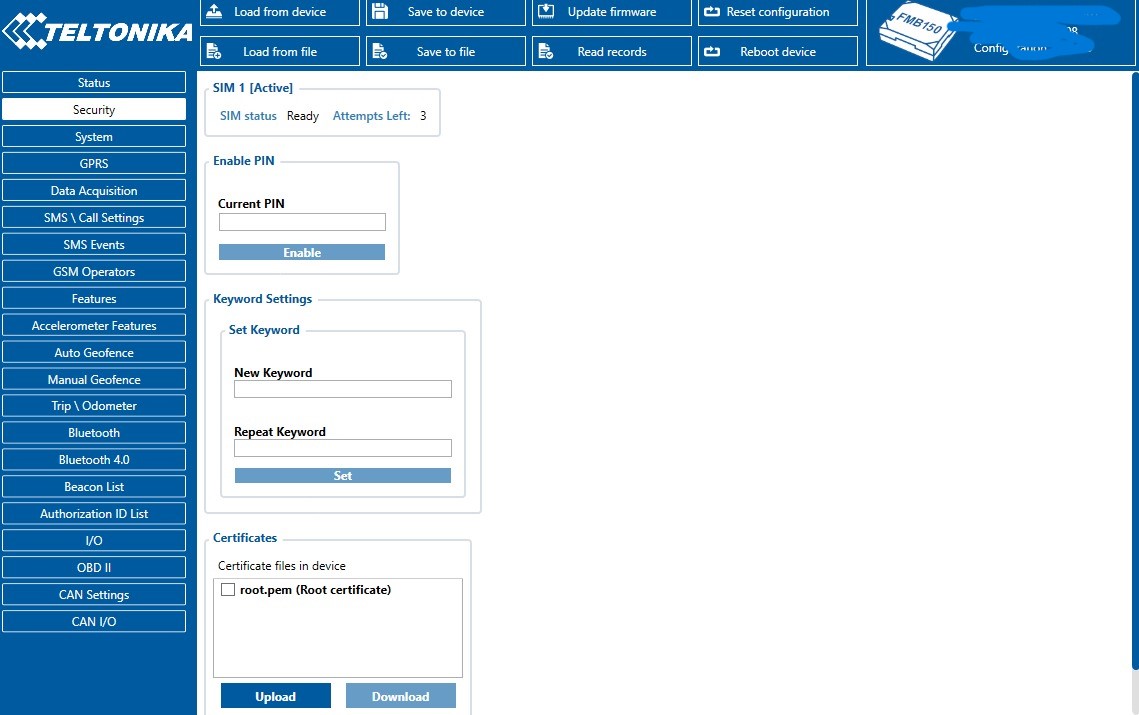
In fact, I can see that you do have configured the MQTT settings incorrectly on the screenshots above. Please recheck the tutorial and enter the correct values there.
Okay, let’s say I dont use teltonika device to send data and I use a simple PLC device which sends the data in JSON. How can I process that in openremote?
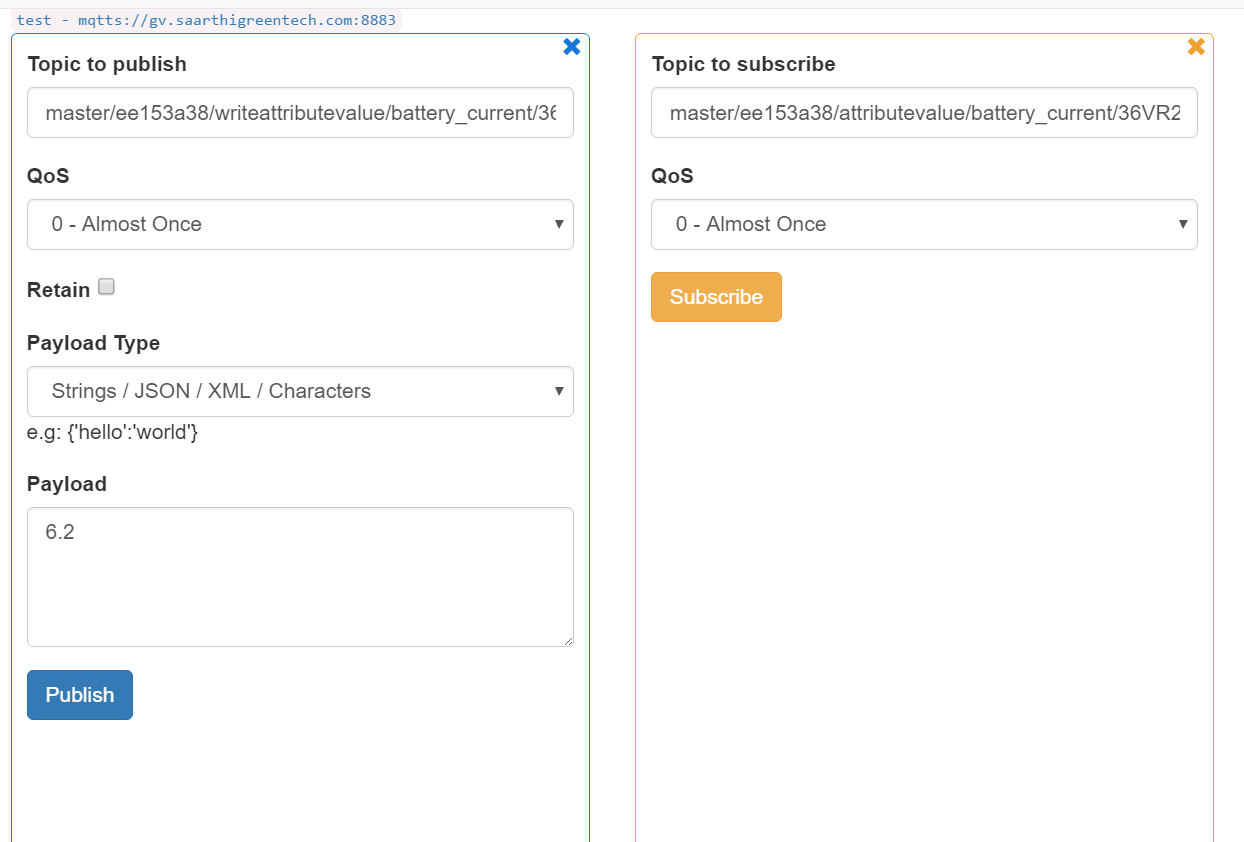
MQTTBox is the only time I have seen the data coming.
I am following the above tutorial but after point of Run as MQTT Publisher , I am completely lost.How to connect via MQTT between openremote and flespi - OpenRemote
I also checked out this thread but couldn’t find anything useful .gv.saarthigreentech.com:8883 ”,
This is my current stream config and I have created a service user in openremote and given all its permissions and then linked the asset (4kfhHMzJeOgWD0fSo1FahF) with the user. I still cant see my stream connecting to openremote.
panos
October 4, 2025, 1:51pm
10
Hey @Saarthi ,
You linked a guide written for Teltonika Networks devices, which is out of scope for the fleet management integration. This means that you can use the generic OpenRemote documentation to configure how your devices connect to OpenRemote’s MQTT broker.
If you are sending data from Flespi to OpenRemote, you can use Agents to connect OpenRemote to external services to retrieve data, or you can use the MQTT service user you created to send data to OpenRemote’s MQTT broker. I’m not familiar with Flespi’s APIs or functionality so I can’t help you much further.
Here’s the documentation for publishing attribute updates to our MQTT broker: Manager APIs | OpenRemote Documentation
And a thread that can help with formatting the messages published to the MQTT broker: Question about JSON format for MQTT ipaddress / geojson
Hope this helps!
system
January 2, 2026, 1:51pm
11
This topic was automatically closed 90 days after the last reply. New replies are no longer allowed.